Set up garmlink in ChatGPT
garmlink connects to ChatGPT as a developer-mode connector over the Model Context Protocol (MCP). Once it's linked, ChatGPT answers from your real, synced Garmin history — no copy-pasting, no screenshots.
Connect your Garmin account
Enable developer mode in ChatGPT
Interfaces that haven't been updated yet keep the same switch under Settings → Apps & Connectors → Advanced → Developer mode. If it isn't in one place, look in the other — a missing switch is almost always one of the two paths, not a missing feature.
Fill in the “New connector” dialog
/mcp) and Authentication (must be OAuth, not “No authentication”).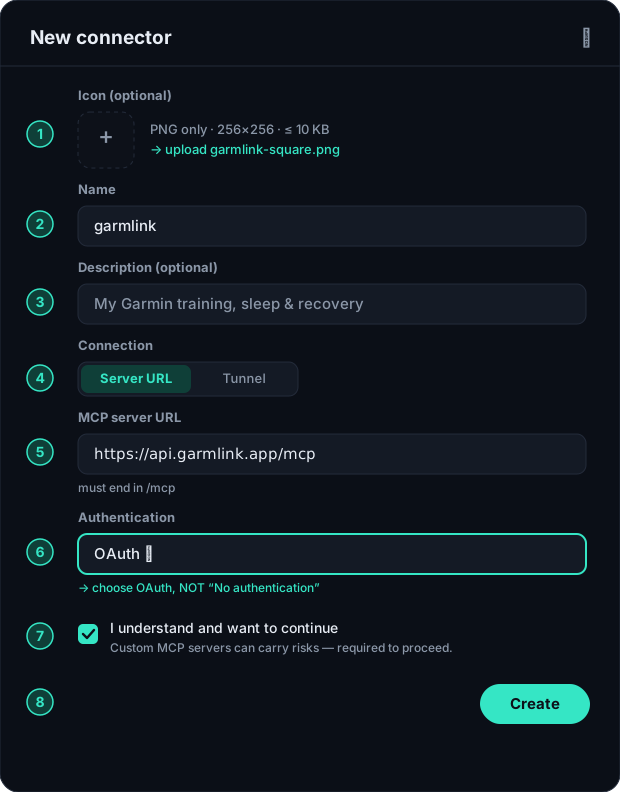
- Name —
garmlink— just the label shown in ChatGPT. - Description (optional) — anything, e.g. “My Garmin training, sleep & recovery”.
- Connection — choose Server URL (not Tunnel).
- MCP server URL — it must end in
/mcp:https://api.garmlink.ai/mcp - Authentication — select OAuth. Do NOT pick “No authentication” — garmlink returns a 401 challenge to start the OAuth sign-in, so “no auth” fails with “Error creating connector”.
- I understand and want to continue — tick it — ChatGPT shows a generic risk notice for any custom MCP server.
- Create — press it. ChatGPT then kicks off the OAuth flow (next step).
Icon (optional)
PNG, 256×256, ≤ 10 KB. The garmlink icon carries its own background, so it stays readable whether the assistant's interface is light or dark.
Once created, the app appears under Drafts in your app settings — that's expected, it stays private to you.
Approve access (OAuth)
Ask your first question
- “Am I ready for my half marathon in 6 weeks?”
- “How has my HRV trended versus my sleep this month?”
- “Which of my rides had the highest normalized power?”
- “Error creating connector.” Almost always one of two things: the URL doesn't end in
/mcp, or Authentication is set to “No authentication” instead of OAuth. Fix either and press Create again. - No connector / developer-mode option. Developer mode exists on Plus, Pro, Business, Enterprise and Education, on the web only. On the free plan, in the mobile apps, or on a workspace where an admin hasn't allowed it, the option simply isn't there. Claude is the way round it: Claude takes custom connectors on its Free plan (one connector, which is all you need here).
- Data looks empty or stale. Check where the sync stands on the Connection screen.
- Reconnect needed. If your Garmin session expired, reconnect from the Connection screen.
Using another assistant? See all four setup guides. Curious what garmlink can read? Browse the tools reference.